

AlternativesVideo & live streaming
YouTube Alternatives for Watching and Posting Video
YouTube alternatives for viewers who want fewer ads and creators facing new Partner Program rules: Nebula, Rumble, Vimeo, Twitch, Kick, TikTok and more.
Disclosure: we may earn a commission if you sign up or buy through links on this page. It costs you nothing extra and never decides a quick answer, a switch card or an Our pick tag. How we make money.

Quick answer
YouTube’s Partner Program bar rises for new applicants on February 1, 20273. Viewers who want no ads: switch to Nebula ($6/month5) or PeerTube (no ads, no tracking10). Creators who want ad-free hosting: Vimeo13. Live streamers: Twitch (Affiliate at 25 followers14) or Kick (you keep 95% of subs15).
At a glance
The alternatives at a glance
| # | Platform | Best for | Fees or starting price | Link |
|---|---|---|---|---|
| 01 | Nebula | Viewers who want ad-free originals and early releases from a curated creator roster | $6/month or $60/year for viewerschecked 2026-11-21 | Visit (opens in a new tab) |
| 02 | Rumble | Viewers and live streamers who want a big general-purpose video site | Free to watch; Premium $9.99/month or $99/yearchecked 2026-11-21 | Visit (opens in a new tab) |
| 03 | Dailymotion | Uploaders who want ad revenue from a low starting bar | Free to watch and upload; ads on videoschecked 2026-11-21 | Visit (opens in a new tab) |
| 04 | PeerTube | Viewers and creators who want no ads, no tracking and the option to self-host | Free, open-source softwarechecked 2026-11-21 | Visit (opens in a new tab) |
| 05 | Odysee | Creators who want blockchain-based hosting and payments | Free to watchchecked 2026-11-21 | Visit (opens in a new tab) |
| 06 | Vimeo | Creators and businesses who want ad-free hosting and their own player | Free plan; Starter $12/seat/month billed annuallychecked 2026-11-21 | Visit (opens in a new tab) |
| 07 | Twitch | Live streamers who want to start earning with a small audience | Free to stream; Affiliate at 25 followerschecked 2026-11-21 | Visit (opens in a new tab) |
| 08 | Kick | Live streamers who want to keep the biggest share of subs and tips | Free to stream; subs are $5/month, streamer keeps 95%checked 2026-11-21 | Visit (opens in a new tab) |
| 09 | TikTok | Creators who already make one-minute-plus vertical videos | Free; rewards need 10,000 followerschecked 2026-11-21 | Visit (opens in a new tab) |
Fees and prices as each platform's own page listed them on the date shown, in US dollars, before tax and payment processing unless the row says otherwise. Confirm on the platform before you move.
Looking for a YouTube alternative usually means one of two things. You watch and you’re tired of ads, or you post and the Partner Program rules have moved against you. On February 1, 2027 YouTube’s new terms take effect: new applicants will need 8,000 watch hours instead of 4,000, and Shorts revenue sharing will need 10 million Shorts views every 90 days13. This guide covers both sides. Where to watch, then where to post, with each platform’s own numbers.
We rank by fit, not by commission, and most of the platforms here pay us nothing. The tools in the creators block that do are marked as affiliate links. Read how we compare and our editorial policy for the full method. More guides like this sit in video streaming.
Why people look for a YouTube alternative
The reasons people leave are in YouTube’s own help pages.
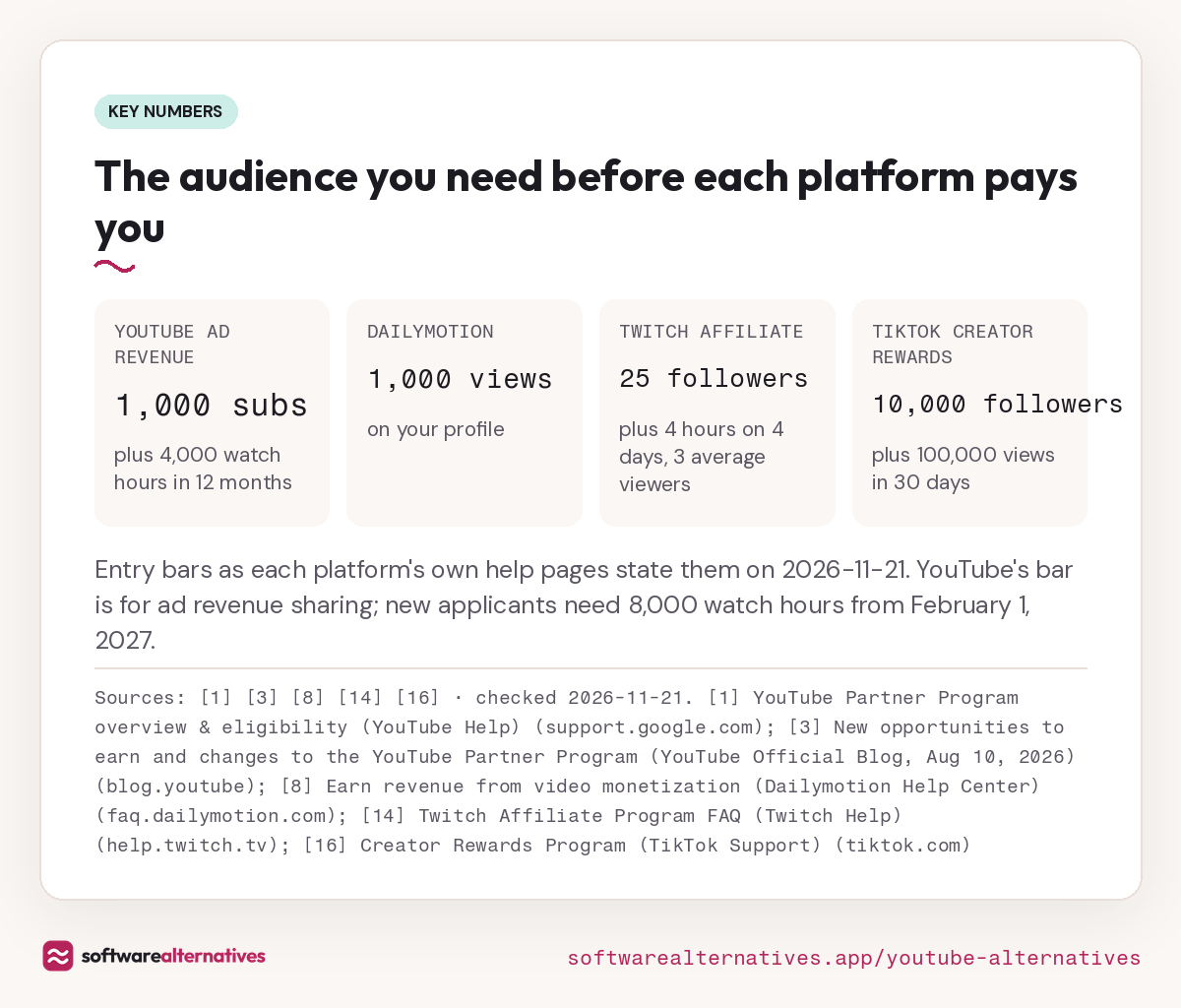
- The bar to get paid. Ad revenue sharing needs 1,000 subscribers plus 4,000 qualified watch hours in the last 12 months, or 1,000 subscribers plus 10 million qualified Shorts views in 90 days1.
- It’s going up. YouTube’s August 2026 announcement says new applicants will need 8,000 watch hours in the last 365 days or 20 million Shorts views in 90 days. From February 1, 2027, Shorts ads and subscription revenue only pay channels with 10 million qualified Shorts views over the last 90 days3. Channels already in the program aren’t affected by the new entry bar3.
- The split. On watch-page ads, YouTube pays partners 55% of net revenue, so it keeps 45%. On Shorts, partners get 45% of the revenue allocated to them from the creator pool2.
- Strikes. A first Community Guidelines strike blocks uploads and live streams for a week. A second within 90 days blocks posting for two weeks, and three strikes in 90 days may remove the channel permanently4.
- Ads for viewers. Monetized videos earn from ads shown on them2; YouTube’s paid route is a Premium or Premium Lite subscription3.
None of these is a reason to delete your channel. They’re reasons to put some of your watching, or some of your videos, somewhere else.
- YouTube ad revenue
- 1,000 subs
- plus 4,000 watch hours in 12 months
- Dailymotion
- 1,000 views
- on your profile
- Twitch Affiliate
- 25 followers
- plus 4 hours on 4 days, 3 average viewers
- TikTok Creator Rewards
- 10,000 followers
- plus 100,000 views in 30 days
Entry bars as each platform’s own help pages state them on 2026-11-21. YouTube’s bar is for ad revenue sharing; new applicants need 8,000 watch hours from February 1, 2027.
Sources: [1] [3] [8] [14] [16] · checked 2026-11-21Download image
Where to watch: alternatives for viewers
These five are for people who mostly watch. Two of them (Rumble and Odysee) also work for creators, and we note what they pay.
1. Nebula
Switch to Nebula if you’d rather pay a small fee than sit through ads, and you like creator-made originals, bonus material and early releases5. Nebula costs $6 a month or $60 a year and describes itself as “unlimited and ad-free”5.
It’s built differently from YouTube. Nebula Entertainment & Broadcasting is 100% creator-owned, profit is split 50/50 between creators and the company, and the creator pool is paid out by watch time5. The trade-off is choice: the roster is curated by the creators themselves5, so you won’t find every channel you follow, and as a creator you can’t simply sign up and upload.
2. Rumble
Switch to Rumble if you want a big general-purpose site to watch for free, with an ad-free upgrade when you want it. Rumble Premium costs $9.99 a month or $99 a year and covers ad-free videos and live streams, exclusive Premium shows and offline downloads in the app6.
For creators, Rumble’s 2026 Creator Program pays from a pool funded by Premium subscriptions, split by minutes watched, new signups and new Premium subscribers you bring in7. Entry needs 100 followers, one hour streamed through Rumble Studio in the last 30 days and an active Premium account of your own7. To be paid for a month you also need 30 hours streamed, 500 hours of watch time, 75 chatters and 20 shorts, among other rules7. That’s a live streamer’s program, not an uploader’s.
3. Dailymotion
Switch to Dailymotion if you upload regular videos and want ad money long before 4,000 watch hours. Dailymotion unlocks monetization once your profile has 1,000 views, and you earn each time an ad is served on your videos8.
The catch for viewers is the same as YouTube’s: videos carry in-stream ads before, during or after playback8. For creators, pay is slow. Revenue is consolidated within 35 days after the end of the month it was earned, so March earnings are final by early May9.
4. PeerTube

Switch to PeerTube if you want video with no ads and no tracking, or want to run your own video site. PeerTube is free, open-source software from Framasoft, a French non-profit, and says plainly that it “does not depend on any advertising and does not track you”10.
There’s no single PeerTube site. Each platform is run by its owner and connects to the others through ActivityPub, so you can follow accounts across sites10. That also means rules and upload limits change from site to site. Creators who want full control can install PeerTube on their own web server at no charge10, but then the server is your job.
5. Odysee
Switch to Odysee if you want a platform that isn’t tied to one company’s ad system and you’re comfortable with crypto payments. Odysee calls itself “a blockchain-based media platform” and hosts video, audio, articles and PDFs11. All of its content is hosted on blockchain technology, though Odysee says you need zero blockchain knowledge to use it11.
Creators earn through tips, memberships and content purchases, which Odysee has moved to blockchain-based payments through an AR wallet12. Its monetization page talks about “reduced fees” but doesn’t publish a fee figure12, so check your wallet costs before you rely on it.
Where to post: alternatives for creators
If you make videos, the question isn’t “where can people watch” but “where do I get paid, and what does it take.” Here are the four strongest options, by kind of creator.
6. Vimeo
Switch to Vimeo if your videos are for clients, a course, a brand or your own website, and you want a clean player with no ads on it. Vimeo says it never puts ads before, during or after your videos, even on the Free plan13.
Pricing is per seat. Starter is $12 a month billed annually ($144 a year) or $20 billed monthly, with 2TB of storage; Standard is $25 billed annually; Advanced is $75 billed annually13. Every plan, Starter included, lists “Sell videos as a subscription service”13. Two limits to know: the Free plan allows 2 videos a month and 25 in total, and live streaming needs Advanced or Enterprise13. Self-serve plans also carry a 2TB monthly bandwidth limit13. Vimeo hosts your videos, but it won’t bring you viewers: people don’t browse it the way they browse YouTube.
7. Twitch
Switch to Twitch if you stream live and want to start earning with a small community. You’re invited to the Affiliate program once you reach 25 followers, stream 4 hours on 4 different days and average 3 viewers over any 4 stream days in the last 30 days14.
Compare that with YouTube’s 1,000 subscribers1. The trade-off is format: everything on Twitch is built around streaming live, so a channel of edited uploads won’t qualify. You can also have monetization on at most 5 accounts14.
8. Kick
Switch to Kick if you stream live and the size of the cut matters most. Kick uses a 95/5 split on subscriptions and KICKs (its tipping currency): subs are a flat $5 a month, you receive $4.75, and the 5% covers payment processing15. Kick also runs Bounties, where Kick or brands pay streamers for clips15.
You need to become a Kick Affiliate or Partner before any of that pays15. If you stream on both, a multistreaming tool (below) saves you choosing on day one.
9. TikTok
Switch to TikTok if you already shoot vertical videos and YouTube’s 2027 Shorts rule would cut you out. TikTok’s Creator Rewards Program pays per 1,000 qualified views, and each eligible video starts earning at 1,000 qualified For You views16.
The entry bar is higher than it looks. You need to be 18 or older, have at least 10,000 followers and 100,000 video views in the last 30 days, and post original videos at least one minute long16. Duets, Stitches, reposted clips and looping or photo-only videos don’t count16.
Streaming and recording tools for creators
These tools let you keep YouTube and add a second platform without doubling your work. These three links are affiliate links: we may earn a commission if you sign up, at no cost to you.
- Restream sends one live stream to 30+ destinations, including YouTube, Twitch and TikTok. Its Free plan multistreams to two channels at once, with Restream branding on the stream17. Good for testing Kick or Twitch next to YouTube.
- Switcher Studio turns iPhones, iPads, Macs and cameras into one multi-camera setup, up to 9 angles, and goes live on YouTube, Facebook, Instagram, TikTok, X and more at once18. It has a 14-day free trial18.
- Riverside records solo or with remote guests in up to 4K with uncompressed audio, recorded on each person’s device so a weak connection doesn’t spoil the file, and lets you edit by cutting the transcript19. Good for podcasts and interviews you post anywhere.
How to choose
Start with what you do most.
- You only watch. Nebula if you want a curated, ad-free catalog5; PeerTube if you want free and no tracking10; Rumble Premium if you want a broad site without ads6.
- You upload edited videos. Dailymotion pays from a low bar but pays slowly89. Vimeo is the pick if the videos live on your site, in a course or with clients, because nothing plays before them13. Our pick for most uploaders is to keep YouTube for reach and use Vimeo for the videos you sell.
- You stream live. Twitch if you’re starting small14; Kick if you want the largest share of subs15. Stream to both with a multistreaming tool rather than choosing.
- You make short vertical videos. TikTok, once you have 10,000 followers16.
If you also write, our guide to Ghost alternatives covers paid newsletters and member blogs.
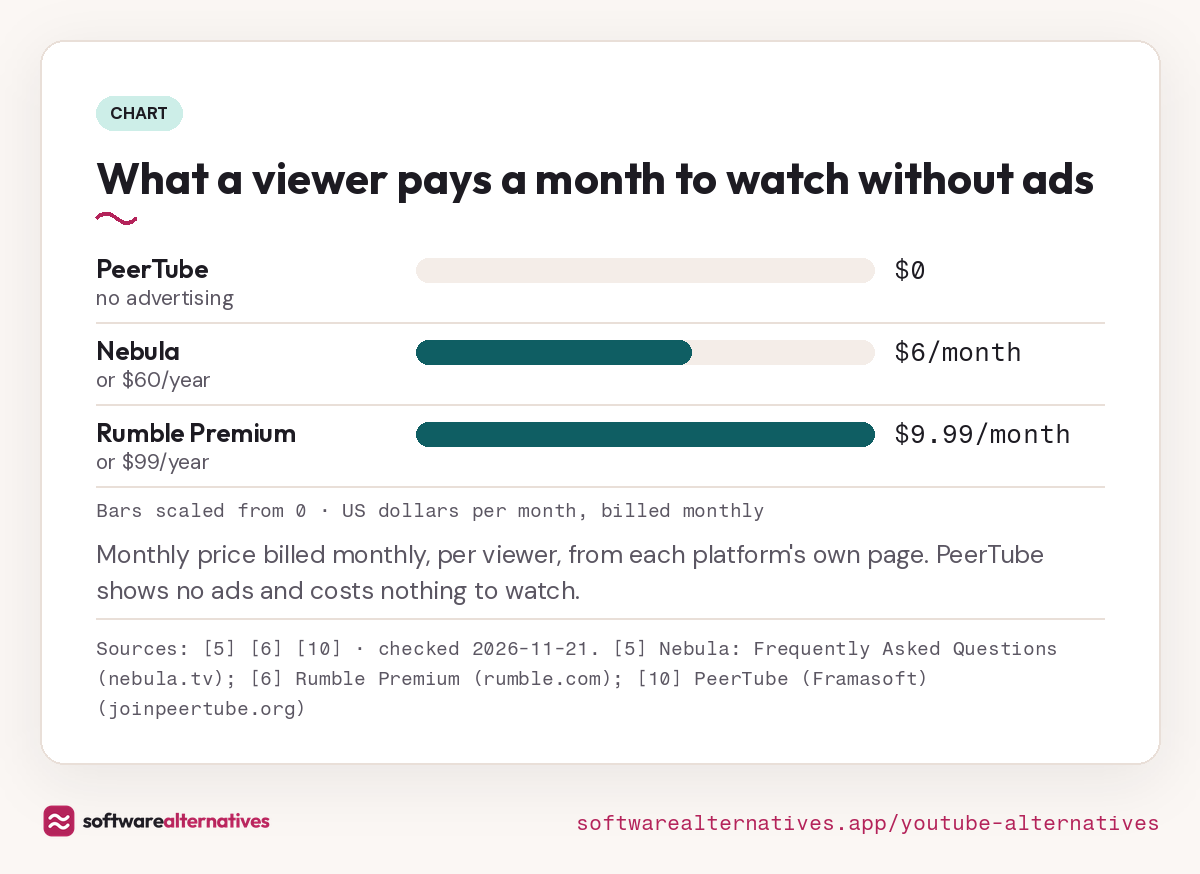
Bars scaled from 0 · US dollars per month, billed monthly
Monthly price billed monthly, per viewer, from each platform’s own page. PeerTube shows no ads and costs nothing to watch.
Sources: [5] [6] [10] · checked 2026-11-21Download image
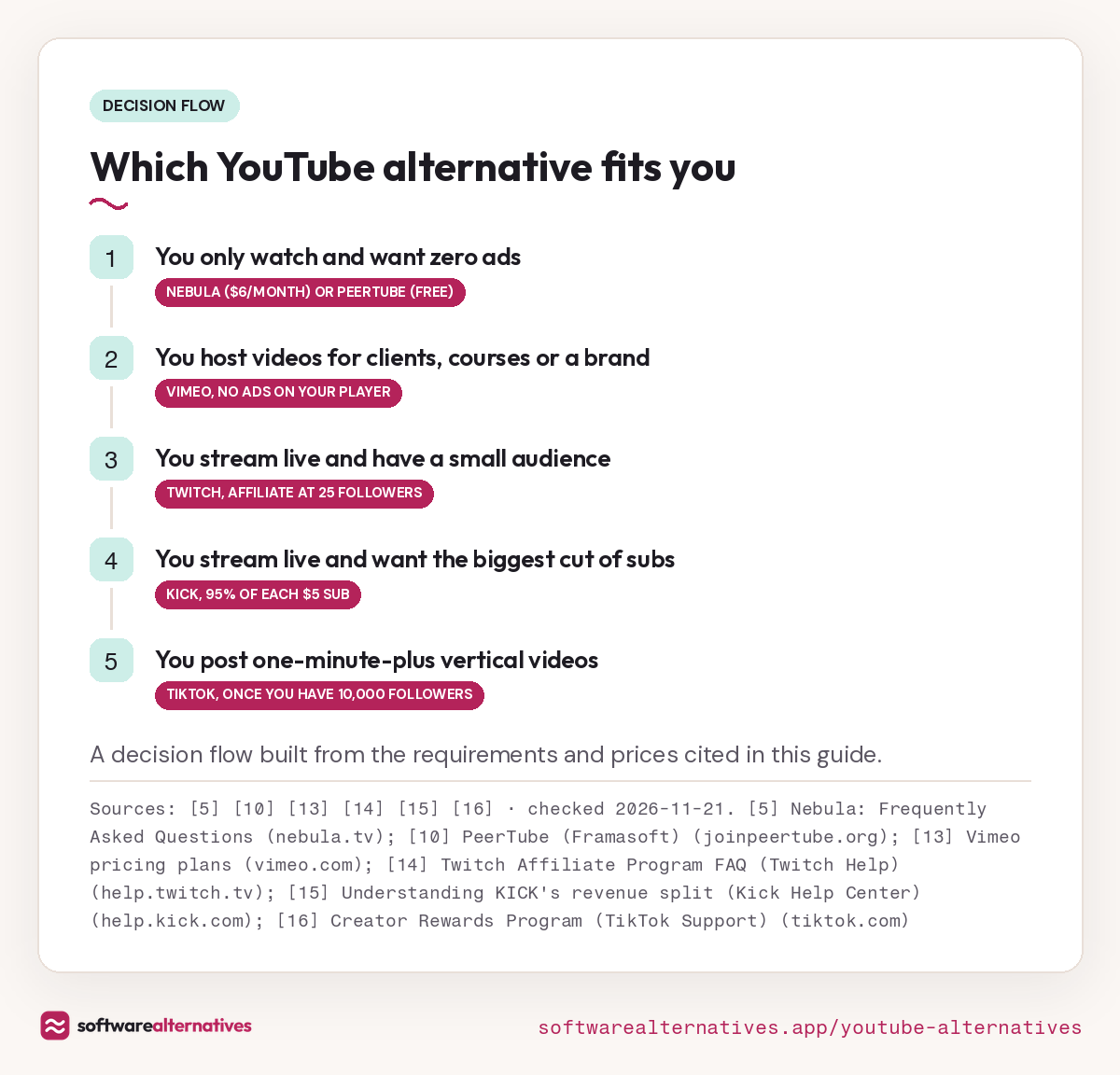
- You only watch and want zero adsNebula ($6/month) or PeerTube (free)
- You host videos for clients, courses or a brandVimeo, no ads on your player
- You stream live and have a small audienceTwitch, Affiliate at 25 followers
- You stream live and want the biggest cut of subsKick, 95% of each $5 sub
- You post one-minute-plus vertical videosTikTok, once you have 10,000 followers
A decision flow built from the requirements and prices cited in this guide.
Sources: [5] [10] [13] [14] [15] [16] · checked 2026-11-21Download image
Fees and payouts
Fees, plans and payouts
Nebula
Nebula subscription
$6/month or $60/year
Paid by the viewer · checked 2026-11-21
- Viewer price
- $6/month or $60/year
- Ads
- None ("Unlimited and ad-free")
- Creator pay
- 50/50 profit split, paid by watch time
- Who can post
- A curated creator roster
Rumble
Rumble Premium
$9.99/month or $99/year
Paid by the viewer · checked 2026-11-21
- Viewer price
- Free with ads; Premium $9.99/month or $99/year
- Creator program entry
- 100 followers, 1 hour streamed via Rumble Studio in 30 days, active Premium account
- Creator pay
- Share of a Premium-funded pool, by minutes watched and signups
Dailymotion
Dailymotion creator
Free
Ad-supported · checked 2026-11-21
- Viewer price
- Free, with in-stream ads
- Monetization unlock
- 1,000 views on your profile
- Payout timing
- Revenue consolidated within 35 days after month end
PeerTube
PeerTube
Free
Install on your own server or join an existing platform · checked 2026-11-21
- Viewer price
- Free
- Ads
- None
- Software cost
- Free and open source; no payment to install
Odysee
Odysee
Free
Tips, memberships and purchases through a blockchain wallet · checked 2026-11-21
- Viewer price
- Free
- How it hosts
- Content hosted on blockchain technology
- Creator pay
- Tips, memberships and content purchases via blockchain payments
Vimeo
Free
$0
2 videos/month, up to 25 videos total · checked 2026-11-21
- Ads on your videos
- None, even on Free
- Upload limit
- 2 videos/month, 25 total
Starter
$12/seat/month
Billed annually ($144/year); $20 billed monthly · checked 2026-11-21
- Storage
- 2TB
- Bandwidth
- 2TB/month
- Selling
- Sell videos as a subscription service
Advanced
$75/seat/month
Billed annually ($900/year); $125 billed monthly · checked 2026-11-21
- Live streaming
- Included (needs Advanced or Enterprise)
- Storage
- 7TB
Twitch
Twitch Affiliate
Free
Invite-based once you hit four milestones · checked 2026-11-21
- Followers
- 25
- Streaming
- 4 hours, on 4 different days
- Viewers
- Average of 3 viewers on 4 stream days in the last 30 days
Kick
Kick Affiliate or Partner
Free
95/5 split on subs and KICKs · checked 2026-11-21
- Subscription price
- Flat $5/month per viewer
- Streamer keeps
- $4.75 per sub (95%)
- Platform share
- 5%, which covers payment processing
TikTok
Creator Rewards Program
Free
Rewards per 1,000 qualified views · checked 2026-11-21
- Followers
- At least 10,000
- Views
- 100,000 in the last 30 days
- Video length
- At least one minute
- Age
- 18 or older (19 in South Korea)
Gains and trade-offs
What you gain, what you give up
You gain
- Gain: Ad-free viewing for one flat price
- Gain: Creator-owned, with profit split 50/50 with creators
You give up
- Trade-off: A paid subscription for viewers
- Trade-off: Creators can’t just sign up and upload
You gain
- Gain: Premium removes ads and adds offline downloads
- Gain: Creator program pays from Premium subscription profits
You give up
- Trade-off: Creator program needs your own paid Premium account
- Trade-off: Monthly payout rules are built around live streaming
Dailymotion
Visit Dailymotion (opens in a new tab)You gain
- Gain: Monetization unlocks at 1,000 profile views
- Gain: Ad revenue on every view once unlocked
You give up
- Trade-off: Viewers still see ads before, during or after videos
- Trade-off: Earnings settle more than a month after they’re made
PeerTube
Visit PeerTube (opens in a new tab)You gain
- Gain: No advertising and no tracking
- Gain: Run your own video site that still connects to others
You give up
- Trade-off: Each site is run by its owner, so rules differ by site
- Trade-off: Self-hosting means running your own web server
You gain
- Gain: Hosts video, audio, articles and PDFs in one place
- Gain: Memberships let fans pay you monthly
You give up
- Trade-off: Payments run through a crypto wallet
- Trade-off: No published fee figures on the monetization page
You gain
- Gain: No ads before, during or after your videos
- Gain: Sell videos as a subscription on every paid plan
You give up
- Trade-off: Free plan caps uploads at 2 a month and 25 total
- Trade-off: Live streaming starts on the $75/month Advanced plan
You gain
- Gain: Monetization starts at 25 followers
- Gain: Built around live streaming and chat
You give up
- Trade-off: You have to stream live to qualify
- Trade-off: Monetization on at most 5 accounts
You gain
- Gain: Keep 95% of subscription and KICKs revenue
- Gain: Paid clip campaigns (Bounties) for short-form video
You give up
- Trade-off: You need Affiliate or Partner status to earn
- Trade-off: Subs are one flat $5 price
You gain
- Gain: Rewards on each video once it passes 1,000 qualified views
- Gain: Short vertical videos are the whole feed
You give up
- Trade-off: 10,000 followers before any rewards
- Trade-off: Duets, Stitches and reposted clips don’t qualify
When to stay on YouTube
Stay if you’re already in the YouTube Partner Program. YouTube says the 2027 entry thresholds don’t affect existing members, and the entry bars for Fan Funding and shopping are unchanged3. You keep 55% of net watch-page ad revenue2, which is a known number, while Rumble and TikTok pay from pools that depend on how other creators perform716.
Stay, too, if you don’t stream live: Twitch and Rumble’s creator programs are built around live hours714, and Kick pays on subs and tips that come from live viewers15. And stay if your audience is small and you’d be starting over: TikTok wants 10,000 followers before it pays16. For most creators the answer is YouTube plus one platform, not YouTube or one platform.
FAQ
Questions people ask
What is the best YouTube alternative for watching without ads?
Is YouTube changing its Partner Program in 2027?
Yes. YouTube says new applicants will need 8,000 qualified watch hours in the last 365 days or 20 million qualified Shorts views in 90 days, and from February 1, 2027 Shorts revenue sharing needs 10 million qualified Shorts views in 90 days. Creators already in the program keep their place3.
Where can I earn from video with a small audience?
Can I stream to YouTube and another platform at once?
Does Vimeo put ads on my videos?
No. Vimeo says it never puts ads before, during or after your videos, even on its Free plan13.
Sources
Sources
Small numbers in the text, like 1, point here. Each source shows the date we last checked it.
- 1YouTube Partner Program overview & eligibility (YouTube Help)support.google.com
- 2YouTube partner earnings overview (YouTube Help)support.google.com
- 3New opportunities to earn and changes to the YouTube Partner Program (YouTube Official Blog, Aug 10, 2026)blog.youtube
- 4Community Guidelines strike basics on YouTube (YouTube Help)support.google.com
- 5Nebula: Frequently Asked Questionsnebula.tv
- 6Rumble Premiumrumble.com
- 7Rumble 2026 Creator Program (Rumble Knowledge Base)rumble.support
- 8Earn revenue from video monetization (Dailymotion Help Center)faq.dailymotion.com
- 9Payout schedule (Dailymotion Help Center)faq.dailymotion.com
- 10PeerTube (Framasoft)joinpeertube.org
- 11What is Odysee? (Odysee Help Hub)help.odysee.tv
- 12Wallet & monetization (Odysee Help Hub)help.odysee.tv
- 13Vimeo pricing plansvimeo.com
- 14Twitch Affiliate Program FAQ (Twitch Help)help.twitch.tv
- 15Understanding KICK's revenue split (Kick Help Center)help.kick.com
- 16Creator Rewards Program (TikTok Support)tiktok.com
- 17Restreamrestream.io
- 18Switcher Studioswitcherstudio.com
- 19Riversideriverside.com
Updated . Spotted a fee that changed? Tell us and we will check it against the platform's own page.